
PRESSING INSTRUCTIONS
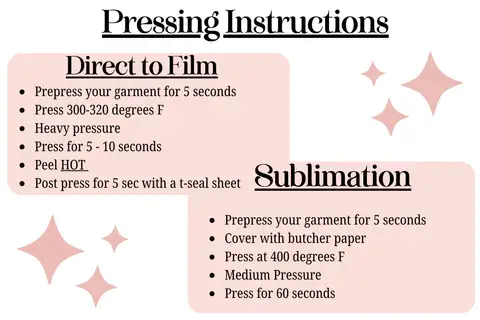
Pressing instructions DTF
- Heat your heat press to 300 – 320 Degrees
- Pre-Press shirt to remove any wrinkles or moisture for 3-5 seconds
- Align your transfer
- Use heavy pressure and press for 5-10 seconds
- Use a quick motion to peel the transfer backing
- Do a second press using T-Seal for 5 seconds
- You can experiment with different papers/fabrics to get the best feel/finish on your second press
Single Color Screen Prints
- Pre-press your garment for 5 seconds
- Press at 315-325 degrees F
- Heavy pressure
- Press for 10 seconds
- Peel HOT
Sublimation Prints
- Pre-press your garment for 5 seconds
- Cover with butcher paper
- Press at 400 degrees F
- Medium Pressure
- Press for 60 seconds
- PLEASE NOTE: Sublimation works best on 65% of higher polyester garments & lighter colored garments.
Clear Film Prints
- Pre-press your garment for 5 seconds
- Press at 325-350 degrees F
- Heavy pressure
- Press for 20 seconds
- Peel HOT
Puff Prints
- Pre-press your garment for 5 seconds
- Press at 340-350 degrees F
- Heavy Pressure
- Press for 7 seconds
- Peel HOT
Please be mindful that NOT all heat presses are the same. You will need to test your heat press to find what works the best for you.